APC
zasilacz UPS
RBCV200
APC RBCV200 Instrukcja
Oto APC RBCV200 (zasilacz UPS) instrukcja użytkownika. 1 strony w języku Angielski o wadze 0.1 Mb. Jeśli nie możesz znaleźć odpowiedzi na swoje pytanie Zapytaj naszą społeczność.
Strona 1/1
CAUTION:
Only qualied persons should remove the battery.
Use APC authorized batteries only.
Use authorized battery recycler. See www.apc.com/recycle for information on
recycling services oered in your country.
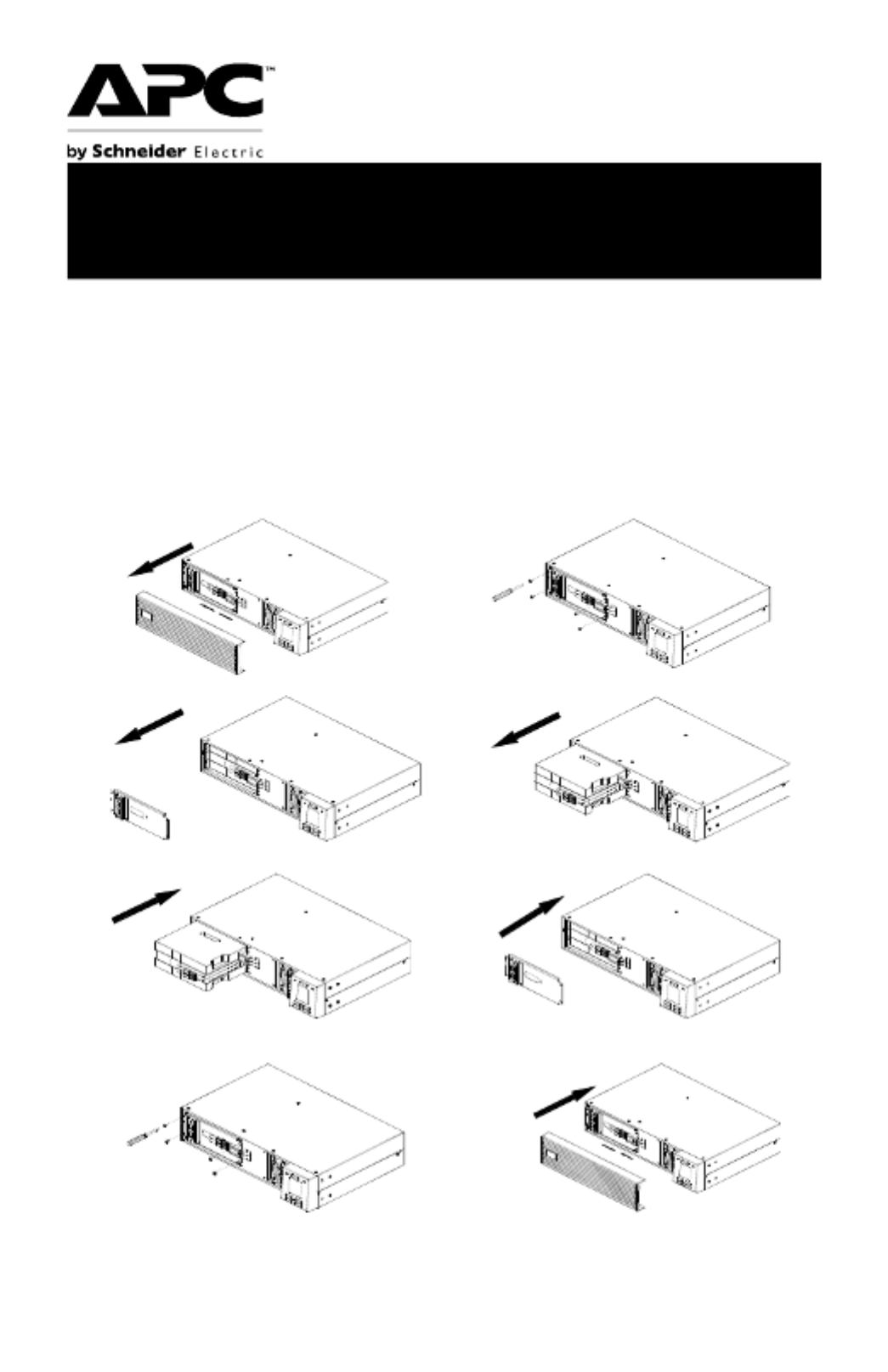
SRV/SRVS Rack-Mount 1000/2000/3000 VA
1.
Remove the front bezel of the UPS
and disconnect the battery cable.
2.
Locate the screws (4 nos.) securing
the battery plate and unfasten them.
3.
Remove the battery plate.
4.
Slide out the old battery.
5.
Insert the new battery.
6.
Re-install the battery plate removed
in step 2.
7.
Secure the battery plate by
fastening the screws (4 nos.).
8.
Re -connect battery cable and re-
install the front bezel of the UPS.
NOTE: The above illustrations are for representation only. The battery replacement
procedure remains the same for all the UPS ratings.
Quick Installation Guide for Battery
Cartridge Replacement
© 2022 APC by Schneider Electric. APC, the APC logo are
owned by Schneider Electric Industries S.A.S., or their
aliated companies. All
other trademarks are property of their respective owners
EN TME11795
06/2022
Rozwiązywanie problemów APC RBCV200
Jeśli dokładnie przeczytałeś instrukcję, ale nie znalazłeś rozwiązania swojego problemu, poproś o pomoc innych użytkowników
Specyfikacje
| Kolor produktu: | Czarny |
| Certyfikat środowiskowy (zrównoważonego rozwoju): | REACH |
| Pojemność baterii: | 9 Ah |
| Technologia baterii: | Ołowiany (VRLA) |
| Napięcie baterii: | 24 V |
| Liczba baterii włączone: | 2 szt. |