Caso
Robot kuchenny
FW 2500 Black
Caso FW 2500 Black Instrukcja
Oto Caso FW 2500 Black (Robot kuchenny) instrukcja użytkownika. 136 strony w języku Nederlands o wadze 3.0 Mb. Jeśli nie możesz znaleźć odpowiedzi na swoje pytanie Zapytaj naszą społeczność.
Strona 1/136
Operation Guide 3437
E-9
Screen To do this: Do this:
Reset the seconds to . Press .D
Toggle between Daylight Saving
Time ( ) and Standard Time ( ). Press .D
Change the city code. Use (east) and (west).D B
Change the hour or minutes. Use (+) and (–).D B
Toggle between 12-hour ( ) and
24-hour ( ) timekeeping. Press .D
Change the year. Use (+) and (–).D B
Change the month or day. Use (+) and (–).D B
Toggle the setting between
1.5 seconds ( ) and 3 seconds ( ). Press .D
x See “Daylight Saving Time (DST)” on page E-10 for details about DST setting.
E-8
Changing the Current Home City Time and Date Settings
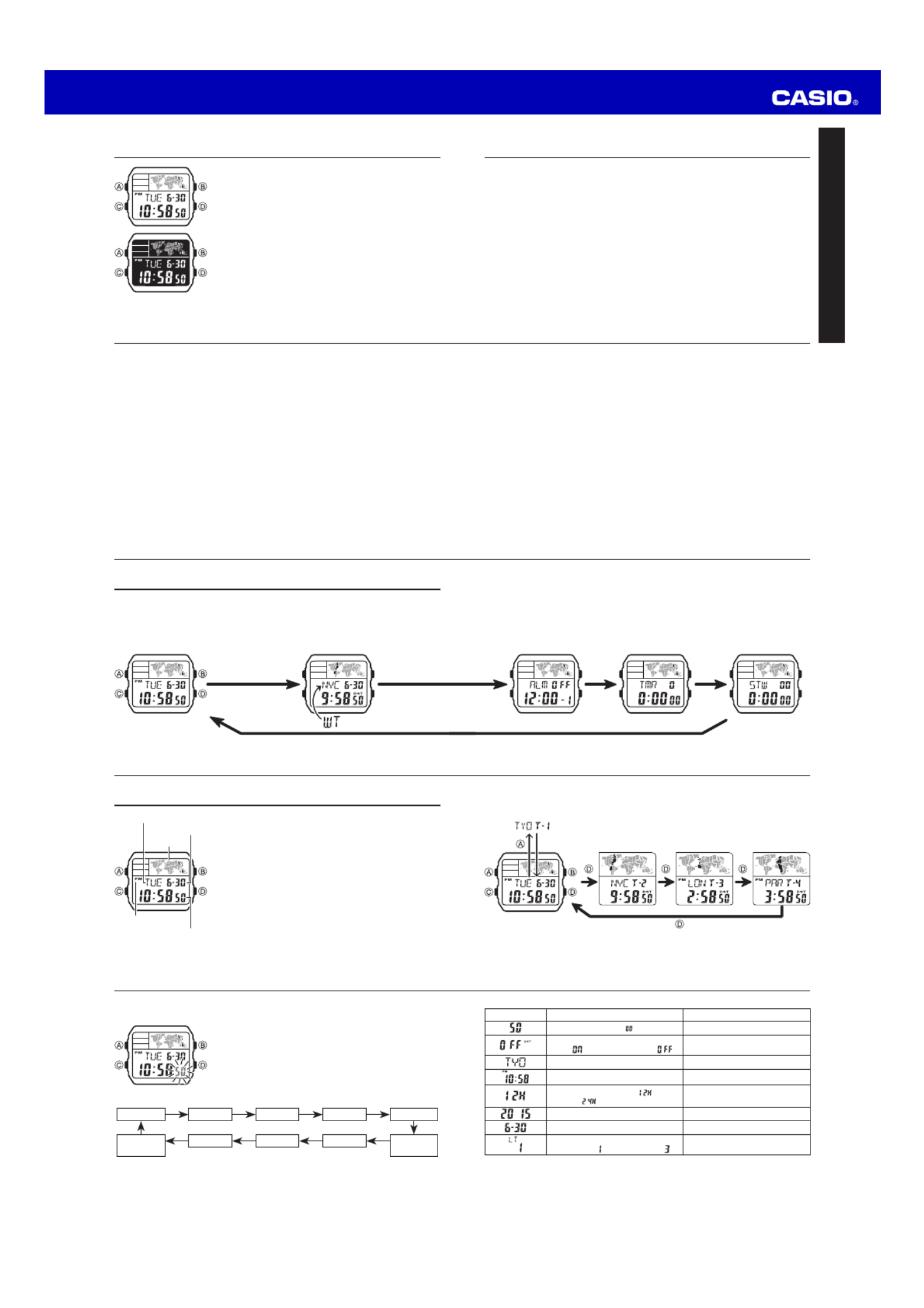
1. Use to display the current Home City Time (T-1) D
screen.
2. Hold down until the seconds start to fl ash, which A
indicates the setting screen.
3. Press to move the fl ashing in the sequence shown C
below to select other settings.
Seconds
YearDay
Illumination
Duration C C
C
Minutes
12/24-Hour
Format
C
C
Month
C
HourDST
C C C
City Code
C
4. When the setting you want to change is fl ashing, use and to change it as D B
described below.
E-7
Switching Between Time Screens
Each press of cycles the time screens in the sequence shown below.D
Displayed for one second.
x You can change the current time setting for your Home City Time (T-1) only.
x For Local Times (T-2, T-3, T-4), you only can change the city code and DST setting.
E-6
Timekeeping
The Timekeeping Mode’s Multi Time feature gives you
quick and easy access to the current time and date in four
different cities, numbered from T-1 (Time 1) through T-4
(Time 4). T-1 is your Home City Time, and T-2, T-3, and
T-4 are Local Times. Local Times are kept in
synchronization with your Home City Time (T-1).
Month – Day
Map
Day of week
PM indicator
Hour : Minutes Seconds
E-5
C C
C
Alarm Mode Countdown Timer
Mode
Stopwatch Mode
E-4
General Guide
x Press to change from mode to mode.C
x In any mode (except when a setting screen is on the display), press to illuminate B
the display.
C
Timekeeping Mode World Time Mode
C
E-3
To turn an alarm on and off .................................................................................. E-22
To turn the Hourly Time Signal on and off .......................................................... E-23
To confi gure the countdown timer ......................................................................E-25
To use the countdown timer ................................................................................. E-26
To measure times with the stopwatch ................................................................. E-28
To turn the button operation tone on and off ..................................................... E-31
To turn off Auto Display ........................................................................................ E-34
To turn on Auto Display ........................................................................................ E-34
E-2
Procedure Lookup
The following is a handy reference list of all the operational procedures contained in
this manual.
To toggle the Timekeeping Mode time between DST and Standard Time ....... E-11
To turn on illumination .......................................................................................... E-14
To view the time for another city code ................................................................ E-15
To toggle a city code time
between Standard Time and Daylight Saving Time ........................................ E-16
To change your Home Time city to the current World Time city ...................... E-17
To set an alarm time .............................................................................................. E-19
To test the alarm .................................................................................................... E-21
E-1
Contents
General Guide .......................................................................................................... E-4
Timekeeping .............................................................................................................E-6
World Time .............................................................................................................E-15
Alarms .................................................................................................................... E-18
Countdown Timer ..................................................................................................E-24
Stopwatch .............................................................................................................. E-27
Reference ............................................................................................................... E-29
Specifi cations ........................................................................................................E-35
E
About This Manual
x Button operations are indicated using the letters shown
in the illustration.
x Each section of this manual provides you with the
information you need to perform operations in each
mode. Further details and technical information can be
found in the “Reference” section.
MA1408-EA © 2014 CASIO COMPUTER CO., LTD.
Rozwiązywanie problemów Caso FW 2500 Black
Jeśli dokładnie przeczytałeś instrukcję, ale nie znalazłeś rozwiązania swojego problemu, poproś o pomoc innych użytkowników
Specyfikacje
| Marka: | Caso |
| Kategoria: | Robot kuchenny |
| Model: | FW 2500 Black |