Cisco 7961G Instrukcja
Oto Cisco 7961G (telefon) instrukcja użytkownika. 2 strony w języku Nederlands o wadze 0.4 Mb. Jeśli nie możesz znaleźć odpowiedzi na swoje pytanie Zapytaj naszą społeczność.
Strona 1/2
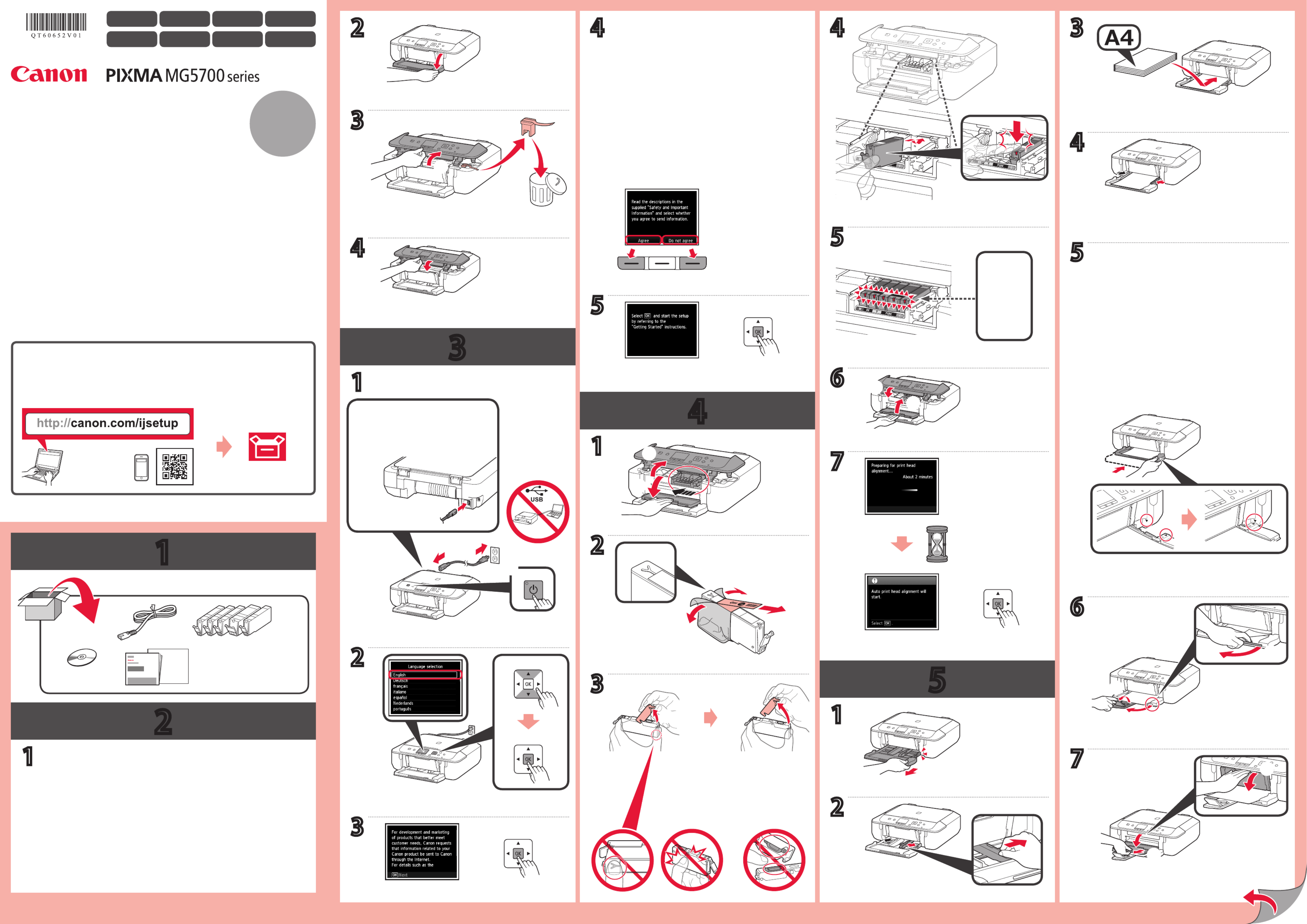
1
2
3
4
5
XXXXXXXX © CANON INC. 2015
1
2
5
3
4
6
7
5
1
6
7
2
1
4
2
3
2
4
3
5
4
1
b
b
a
a
b
b
b
a
a
b
b
b
b
a
b
a
a
b
b
a
a
CD-ROM (Windows) 3
b
a
b
a
a
a
1
Αφαιρέστε την ταινία και τη συσκευασία από τον εκτυπωτή.
Εγχειρίδια
Ξεκινώντας 1
Πίσω μέρος
Χρησιμοποιήστε το αριστερό ή το δεξί κουμπί Λειτουργία
(Function) για να επιλέξετε μία από τις δύο επιλογές.
Είναι αναμμένη
Σπρώξτε προς τα μέσα την κασέτα μέχρι το και το ] [
να ευθυγραμμιστούν.
ΕΛΛΗΝΙΚΗ
Βίντεο με οδηγίες
Αργά.
Retire la cinta y los materiales de protección del exterior de la impresora.
Manuales
Guía de inicio 1
Parte posterior
Utilice el botón izquierdo o derecho Función (Function)
para seleccionar una de las dos opciones.
Encendida
Empuje el cassette hacia dentro hasta que y estén ] [
alineados.
ESPAÑOL
Tutoriales en vídeo
Lentamente.
Remova a ta e os materiais de embalagem da parte externa da impressora.
Manuais
Para Começar 1
Parte traseira
Use o botão esquerdo ou direito para Função (Function)
selecionar uma de duas opções.
Aceso
Empurre o cassete até que e ] [ se alinhem.
PORTUGUÊS
Tutoriais em Vídeo
Devagar.
Rimuovere il nastro e il materiale di imballaggio dall'esterno della stampante.
Manuali
Guida Rapida 1
Retro
Utilizzare il pulsante sinistro o Funzione (Function)
destro per selezionare una delle due opzioni.
Accesa
Inserire il cassetto e nché ] [ non risultano allineati.
ITALIANO
Tutorial video
Lentamente.
Verwijder de tape en het verpakkingsmateriaal van de buitenkant van de printer.
Handleidingen
Aan de Slag-gids 1
Achterkant
Gebruik de linker of rechter -knop om Functie (Function)
een van de twee opties te selecteren.
Brandt
Duw de cassette erin totdat en ] [ op één lijn liggen.
NEDERLANDS
Videozelfstudies
Langzaam.
Entfernen Sie das Klebeband und das Verpackungsmaterial außen am Drucker.
Handbücher
Inbetriebnahme 1
Rückseite
Verwenden Sie die linke oder rechte Schaltäche Funktion
(Function), um eine der beiden Optionen zu wählen.
Leuchten Schieben Sie die Kassette ein, bis und aufeinander ] [
ausgerichtet sind.
DEUTSCH
Videolernprogramme
Langsam.
Démarrage 1
Retirez la bande ainsi que les matériaux d'emballage de l'imprimante.
Utilisez le bouton de droite ou de Fonction (Function)
gauche pour sélectionner une des deux options.
Poussez la cassette pour la mettre en place, jusqu'à ce
que et ] [ soient alignés.
Manuels
Arrière
Allumé
FRANÇAIS
Didacticiels vidéo
Doucement.
Getting Started 1
Remove the tape and packing materials from outside the printer.
Use the left or right button to select one of the Function
two options.
Push in the cassette until and ] [ line up.
Manuals
Back
Lit
ENGLISH
Video Tutorials
Slowly.
QT6-0652-V01 PRINTED IN XXXXXXXX
RMC (Regulatory Model Code): K10426
Rozwiązywanie problemów Cisco 7961G
Jeśli dokładnie przeczytałeś instrukcję, ale nie znalazłeś rozwiązania swojego problemu, poproś o pomoc innych użytkowników
Specyfikacje
| Marka: | Cisco |
| Kategoria: | telefon |
| Model: | 7961G |