Corsair Ironclaw RGB Instrukcja
Oto Corsair Ironclaw RGB (mysz) instrukcja użytkownika. 2 strony w języku Polski o wadze 0.6 Mb. Jeśli nie możesz znaleźć odpowiedzi na swoje pytanie Zapytaj naszą społeczność.
Strona 1/2
A A A AB B B B
CCCC
K K K K
HHHH
FFFF
DDDD
J J J J
IIII
E E E E
G G G G
corsair.com/downloads
FPS/MOBA GAMING MOUSE
IRONCLAW RGB
WE B: corsair.com
PHONE: (888) 222-4346
SUPPORT: support.corsair.com
BLOG: corsair.com/blog
FORUM: forum.corsair.com
YOUTUBE: youtube.com/corsairhowto
© 2018 CORSAIR MEMORY, Inc. All rights reserved. CORSAIR and the sails logo
are registered trademarks in the United States and/or other countries. All other
trademarks are the property of their respective owners. Product may vary slightly
from those pictured. 49-001761 AA
IRONCLAW RGB
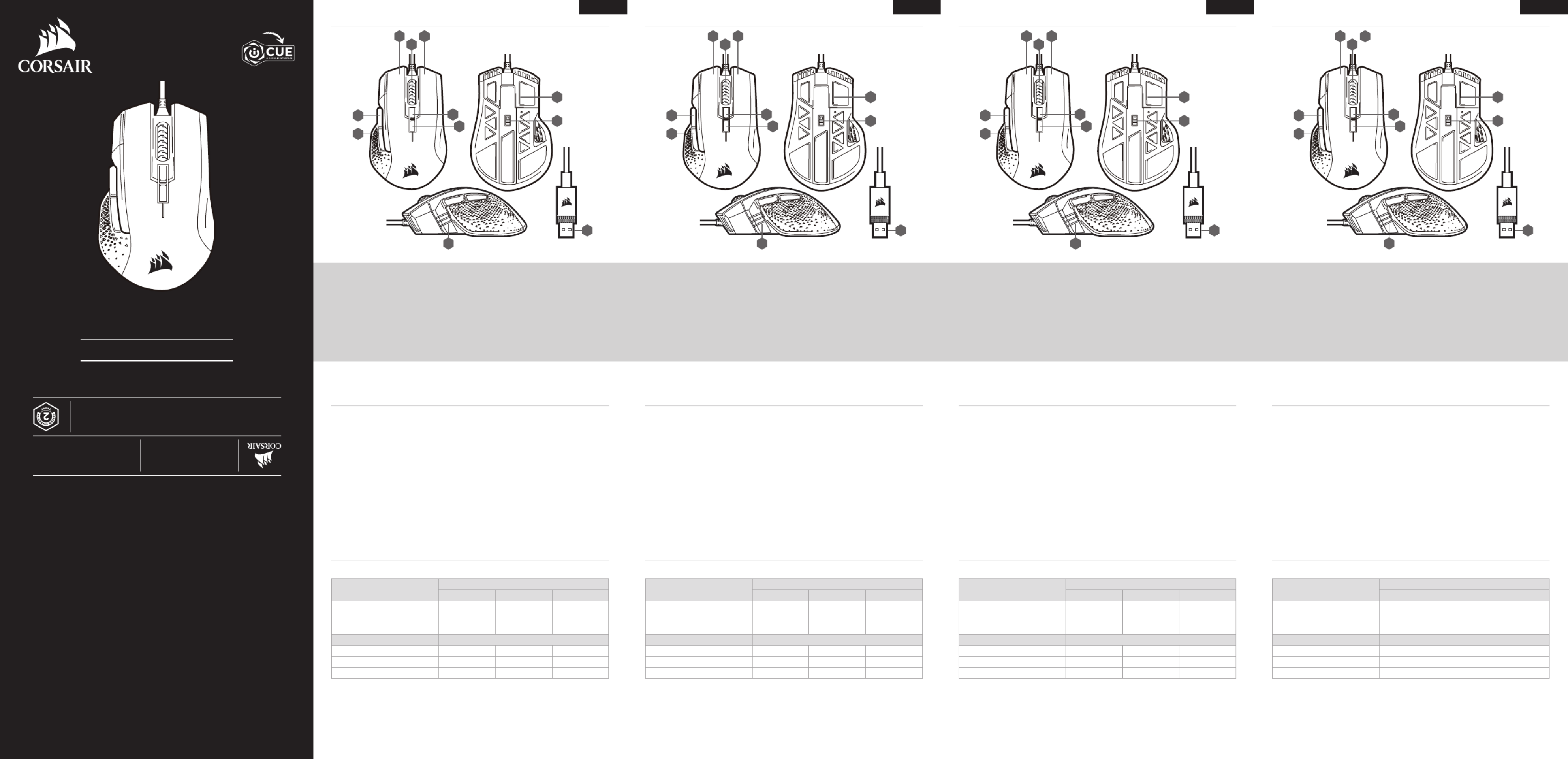
PRÉSENTATION DE LA SOURIS KENNENLERNEN DER MAUSGETTING TO KNOW YOUR MOUSE IL TUO MOUSE IN DETTAGLIO
ENGLISH FRANÇAIS DEUTSCH ITALIANO
A — LINKE MAUSTASTE
B — RECHTE MAUSTASTE
C — MITTLERE MAUSTASTE
D — PROFIL-DURCHLAUF-TASTE
E — DPI-DURCHLAUF-TASTE
F — VORWÄRTS-TASTE
G — RÜCKWÄRTS-TASTE
H — MULTIFUNKTIONS-LED-ANZEIGE
I — PTFE-GLEITFÜSSE
J — OPTISCHER GAMING-SENSOR
K — USB-ANSCHLUSSKABEL
A — LEFT CLICK BUTTON
B — RIGHT CLICK BUTTON
C — MIDDLE CLICK BUTTON
D — PROFILE CYCLE BUTTON
E — DPI CYCLE BUTTON
F — FORWARD BUTTON
G — BACKWARD BUTTON
H — MULTI-PURPOSE LED INDICATOR
I — PTFE GLIDE PADS
J — OPTICAL GAMING SENSOR
K — USB CONNECTION CABLE
A — BOUTON CLIC GAUCHE
B — BOUTON CLIC DROIT
C — BOUTON CLIC DU MILIEU
D — BOUTON CYCLE PROFIL
E — BOUTON CYCLE DPI
F — BOUTON SUIVANT
G — BOUTON PRÉCÉDENT
H — VOYANT À LED MULTIFONCTION
I — PATINS EN PTFE
J — CAPTEUR GAMING OPTIQUE
K — CÂBLE DE CONNEXION USB
A — PULSANTE CLIC SINISTRO
B — PULSANTE CLIC DESTRO
C — PULSANTE CLIC CENTRALE
D — PULSANTE CICLO PROFILO
E — PULSANTE CICLO DPI
F — PULSANTE AVANTI
G — PULSANTE INDIETRO
H — INDICATORE LED MULTIFUNZIONE
I — BASI PER MOUSE IN PTFE
J — SENSORE OTTICO GAMING
K — CAVO COLLEGAMENTO USB
> Turn on your computer.
> Connect the mouse to available USB 2.0 or USB 3.0 port on your computer.
> Download the iCUE software from www.corsair.com/downloads.
> Run the installer program.
> Follow instructions for installation.
SETTING UP YOUR MOUSE
> Schalten Sie Ihren Computer ein.
> Schließen Sie die Maus an einen USB-2.0- oder USB-3.0-Anschluss Ihres Computers an.
> Laden Sie die iCUE-Software von www.corsair.com/downloads herunter.
> Führen Sie das Installationsprogramm aus.
> Folgen Sie den Installationsanweisungen.
> Allumez votre ordinateur.
> Branchez la souris sur un port USB2.0 ou USB3.0 disponible de votre ordinateur.
> Téléchargez le logiciel iCUE sur www.corsair.com/downloads.
> Exécutez le programme d’installation.
> Suivez les instructions d’installation.
> Accendi il computer.
> Collega il mouse a una porta USB 2.0 o USB 3.0 disponibile sul computer.
> Scarica il software iCUE dal sito www.corsair.com/downloads.
> Esegui il programma di installazione.
> Segui le istruzioni di installazione.
EINRICHTEN DER MAUSCONFIGURATION DE LA SOURIS IMPOSTAZIONE DEL MOUSE
Über die Multifunktions-LED-Anzeige an der linken Seite der Maus werden verschiedene Angaben zum
Mausbetrieb angezeigt.
Various aspects of mouse operation are communicated through the multi-purpose LED indicator located on the
left side of the mouse. Le voyant à LED multifonctions permet de signaler les différents états de la souris. Il est situé sur le côté gauche
de la souris.
MULTIFUNKTIONS-LED-ANZEIGEMULTI-PURPOSE LED INDICATOR VOYANT À LED MULTIFONCTION
Mediante l’indicatore LED multifunzione situato sul lato sinistro del mouse vengono comunicati vari aspetti relativi
al funzionamento del mouse.
INDICATORE LED MULTIFUNZIONE
ONBOARD PROFILE STATUS
MULTI-PURPOSE LED INDICATOR
LED #1 LED #2 LED #3
PROFILE #1 RED OFF OFF
PROFILE #2 OFF GREEN OFF
PROFILE #3 OFF OFF BLUE
DPI STAGE STATUS
STAGE #1 CYAN OFF OFF
STAGE #2 CYAN CYAN OFF
STAGE #3 CYAN CYAN CYAN
STATUT DE PROFIL EMBARQUÉ
VOYANT À LED MULTIFONCTION
LED #1 LED #2 LED #3
PROFIL #1 ROUGE ÉTEINT ÉTEINT
PROFIL #2 ÉTEINT VERT ÉTEINT
PROFIL #3 ÉTEINT ÉTEINT BLEU
STATUT NIVEAU DPI
NIVEAU #1 CYAN ÉTEINT ÉTEINT
NIVEAU #2 CYAN CYAN ÉTEINT
NIVEAU #3 CYAN CYAN CYAN
ONBOARD-PROFIL-STATUS
MULTIFUNKTIONS-LED-ANZEIGE
LED #1 LED #2 LED #3
PROFIL #1 ROT AUS AUS
PROFIL #2 AUS GRÜN AUS
PROFIL #3 AUS AUS BLAU
DPI-STUFEN-STATUS
STUFE #1 CYAN AUS AUS
STUFE #2 CYAN CYAN AUS
STUFE #3 CYAN CYAN CYAN
STATO PROFILO INTERNO
INDICATORE LED MULTIFUNZIONE
LED #1 LED #2 LED #3
PROFILO N. 1 ROSSO SPENTO SPENTO
PROFILO N. 2 SPENTO VERDE SPENTO
PROFILO N. 3 SPENTO SPENTO BLU
STATO FASE DPI
FASE N. 1 AZZURRO SPENTO SPENTO
FASE N. 2 AZZURRO AZZURRO SPENTO
FASE N. 3 AZZURRO AZZURRO AZZURRO
Rozwiązywanie problemów Corsair Ironclaw RGB
Jeśli dokładnie przeczytałeś instrukcję, ale nie znalazłeś rozwiązania swojego problemu, poproś o pomoc innych użytkowników
Specyfikacje
| Kolor produktu: | Czarny |
| Źródło zasilania: | Kabel. |
| Waga produktu: | 105 g |
| Długość kabla: | 1.8 m |
| Rekomendowane użycie: | PC/Laptop |
| Ilość: | 1 |
| Certyfikaty: | FCC |
| Obsługiwane systemy operacyjne Windows: | Windows 10, Windows 7, Windows 8 |
| Przeznaczenie: | Gaming |
| Układ: | Po prawej stronie |
| Skrócona instrukcja obsługi: | Tak |
| Kod zharmonizowanego systemu (HS): | 84716070 |
| Interfejs urządzenia: | USB Typu-A |
| Typ przewijania (scroll type): | Koło |
| Liczba przycisków: | 7 |
| Rodzaj przycisków: | Wciskane przyciski |
| Rozdzielczość ruchu: | 18000 DPI |
| Programowalne przyciski myszy: | Tak |
| Oświetlenie: | Tak |
| Diody LED: | Tak |
| Wbudowana pamięć: | Tak |
| Liczba przycisków programowalnych: | 7 |
| Trwałość przycisków (milion kliknięć): | 50000000 |