Hikvision DS-KIS607-S Instrukcja
Oto Hikvision DS-KIS607-S (Interkom) instrukcja użytkownika. 4 strony w języku Engels o wadze 0.2 Mb. Jeśli nie możesz znaleźć odpowiedzi na swoje pytanie Zapytaj naszą społeczność.
Strona 1/4
2016-12-13 Model:CRH123 Page: 1 / 2 Edition : A
A . Features
13 Digits LCD Display, Display Hour, Minute, Second, Month, Day,Year and Week
Automatic Calendar(2000~2099)
Dual Time
12 / 24H format selectable, Auto Calendar
Daily Alarm ,Chime hourly and SNZ
1/100 second to 23 hour 59.99 second Chronograph with split functions,12 groups of LAP segment
timing
Countdown function
EL backlight
Touch-tone
B . Operational Manual
1. At any mode, press A key EL backlight for 3s.
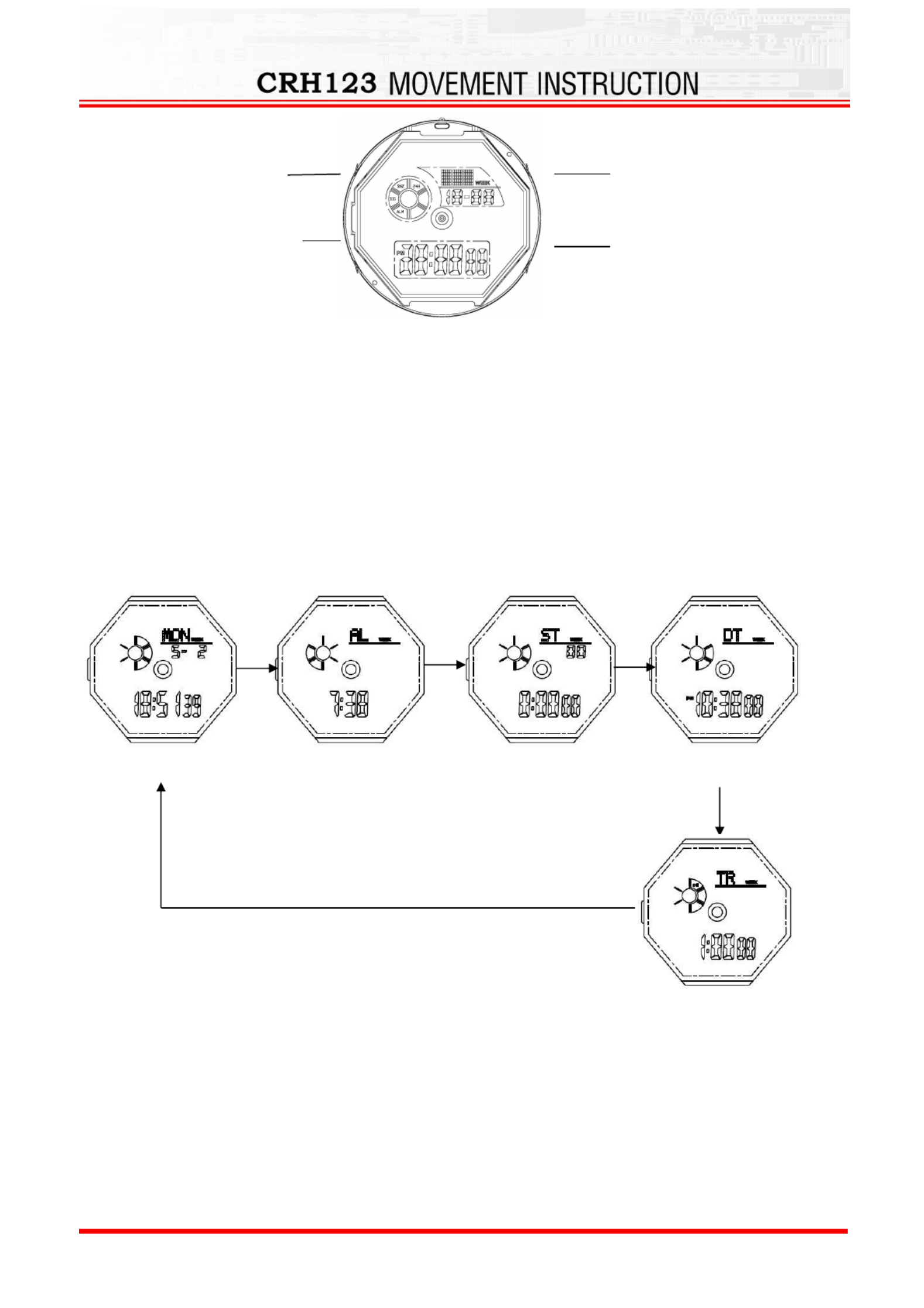
2. Press B to change the display mode
3. In real time mode press D key to switch 12 hours or 24 hours display.
4. Real Time and date
Time Setting
a). Press and hold C key for 2s to time setting mode and "Second" flashing, Press B key to select item as
following sequence :
(
(
(
(( )
)
)
))
C Key
C Key
C Key
C KeyC Key RESET
(
(
(
(( )
)
)
))
D Key
D Key
D Key
D KeyD Key ST/STP
LIGHT(
(
(
(( )
)
)
))
A K
A K
A K
A KA Key
ey
ey
ey ey
MODE(
(
(
(( )
)
)
))
B
B
B
BB Key
Key
Key
KeyKey
Real Time
Chronograph
Alarm
B Key
B Key
B Key
B Key
Dual Time
B Key
Countdown
Rozwiązywanie problemów Hikvision DS-KIS607-S
Jeśli dokładnie przeczytałeś instrukcję, ale nie znalazłeś rozwiązania swojego problemu, poproś o pomoc innych użytkowników
Specyfikacje
| Marka: | Hikvision |
| Kategoria: | Interkom |
| Model: | DS-KIS607-S |